
What is a Platform Data Cleanse?
From time-to-time clients need to delete data from their platforms. A cleanse might include data points like old or unutilised resources, platform users, or demographics. You might be thinking about deleting this data for various reasons, such as remaining compliant with relevant country laws, ensuring platform data reflects accurate HR-held data or just because you like a tidy platform. (We do too! 🥳)
What do I need to know?
Before reaching out to us, there are some steps you (platform admins) can take to ensure your platform is up to date and ready for a data purge to take place. The below prerequisites are tasks we highly recommend* you complete before reaching out to us.
- When deciding to delete any data, we always recommend you ensure you have a copy of the data. Tessello is not a file storage system and shouldn't be treated as such. Although we take regular backups of our client's data, this is for disaster recovery and not for the provision of accessible storage. The client (you) are fully responsible for your data and any backups you may wish to take before the cleanse takes place. You may wish to ensure that the data you wish to cleanse exists elsewhere, such as an HR system or equivalent; it could exist in old exported reports or from a report run from Management Centre, run and exported before the cleanse takes place. Please click here for assistance in running Management Centre reports.
- Sometimes data in your Management Centre doesn't match the data in your HR system. Therefore, you will need to consider utilising your data feed import to refresh your data, ensuring all learners have the most up-to-date information, demographics and active status. Please click here if you don't have a data feed and wish to see how we can help you set one up.
-
If you do not have a data feed and do not want one, you will need to perform some additional actions manually to prepare your Management Centre data for a data cleanse.
> Review and update your learners' status within Management Centre to active/inactive
> Review and update your learners' organisational levels within Management Centre
- If you decide to delete resources, all learning transcripts attached to learners will be deleted along with the resource, including attempts, completions and fails. Furthermore, if the resource is linked to a Programme, Learning Pathway or New Content area, it is also removed from there. If you want to delete a resource but do not want to lose the learning transcripts or break a link to a Programme, Pathway or New Content area, then we highly recommend you not delete the resource and make the resource 'inactive' instead.
- Deleting users (learners) from the platform also deletes any data they have accrued since being added. This includes, but is not limited to:
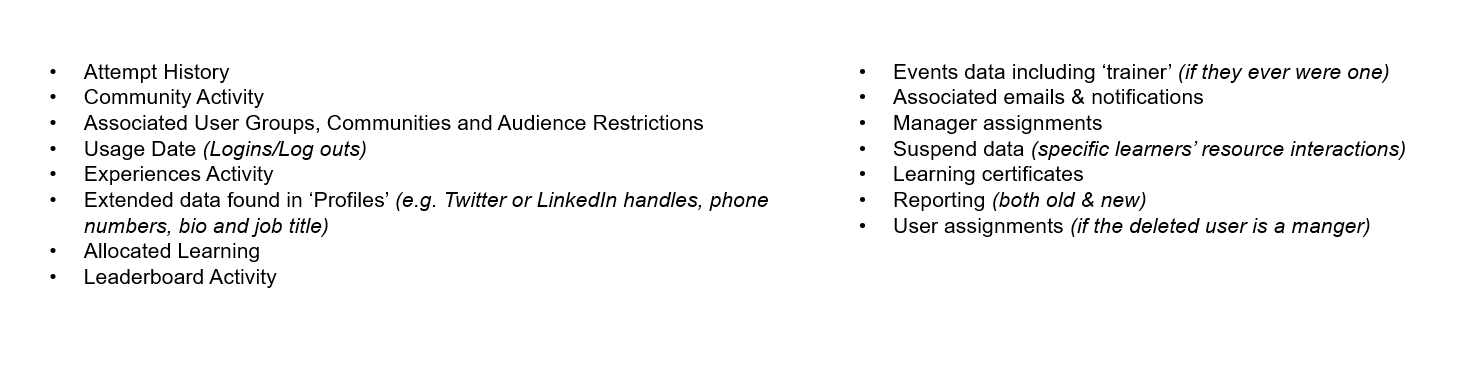
- Should you decide that the above data points be retained in the system but wish to remove user access, you have the option to make a learner 'inactive' instead. This process ensures the learner can not log into the platform but retains their data in the system.
- Organisational levels might be another data point you wish to delete. To proceed with deleting organisational levels, we require that no learners are linked to the specific organisational level in question, following the advice in this article and ensuring that your learners/users are entirely up to date on the platform. You can quickly check your user's organisational levels by running an 'All Learners' report within the Management Centre reporting tool.
*Please note we will ask you if you have completed these steps before the data cleanse work begins. This ensures both parties are working with the correct and most up-to-date data to reduce the risk of data loss or damage and makes the project as seamless as possible. We want to stress that a data cleanse is a permanent deletion, with no ability to retrieve, restore or reclaim the data at any point post-cleanse.
OK, I'm ready
Now you know what a data cleanse is and how to best prepare for it, you'll need to talk to us and advise of the data points you wish to cleanse. From here, we can work with you to produce a statement of work and associated costs for you to review.
We've carefully prepared some templates you will need to download from this page, including the relevant data you would like us to delete. This data can be manually entered or pulled from reports run from your Management Centre, and you must ensure you give this to us in a .CSV (comma-delimited) format. To assist you with finding and pinpointing the data you may wish to cleanse, we have recommended some key reports below.
- All Learner Report includes but is not limited to learners' name, ID number, organisational levels, roles, status, manager assignments & learner status
- Resource Catalogue includes but is not limited to resource ID, resource name, internal resource reference, associated programme & category and total completions
- Enterprise Wide includes but is not limited to learners' name, resource name, resource ID, completion status and attempt history.
Other reports that you could utilise to sense check, spot check or investigate data points could include:
- Community Activity includes but is not limited to learners' name, username, activity, post type and post content
- LeaderBoard Report includes but is not limited to learners' names, learner ID numbers, organisational levels, points scores and board position
- Resource Progress includes but is not limited to resource name, learner name, learner ID, organisational levels, completion status, and date achieved
- Programme Progress includes but is not limited to the programme name, learner name, learner ID, organisational levels, completion status, and date achieved
- Learning Pathway Progress includes but is not limited to pathway name, learner name, learner ID, organisational levels, completion status, and date achieved
- Yet to Login includes but is not limited to learner name, organisational levels and roles
For more information and detail on reports, please check out our dedicated reporting page here.
Thanks! But I need some guidance with the .CSVs provided
No problem at all 👌 let us break these .CSVs down for you and explain what you need to do.
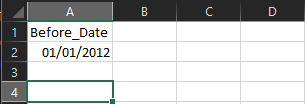
- DataCleanse_USERS.csv - complete column A with a date (a point in time) which we will use to delete any inactive users. For example, if you provide a date of 01/01/2012, we will delete all learners who appear inactive and were added before this date.
Example DataCleanse_USERS.csv
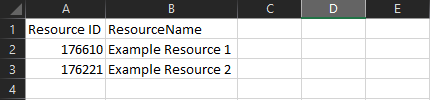
- DataCleanse_RESOURCES.csv - complete columns A & B with the exact resource ID and resource name found in Management Centre. You can source this information from the Resource Catalogue report, which you can run in the Management Centre reporting tool, specifically columns A & B in that particular report (see below).
- Please note that the resource can appear as offline, active or inactive in Management Centre, and you do not have to change this status in Management Centre for the resource to be included in the .CSV and deleted.
Resource Catalogue Report

DataCleanse_RESOURCE.csv Example (using the above report results)
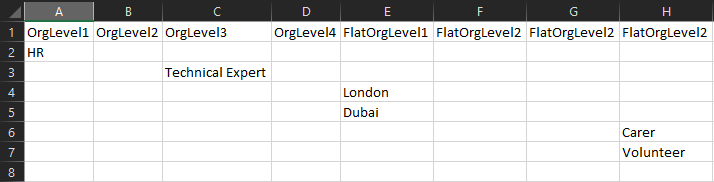
- DataCleanse_ORGLEVELS.csv - populate one organisational level per row under the correct column heading. Only populate organisational levels that a learner is not currently using. If the organisational level is in use, it can not be deleted. You may not have all 8 of these organisational levels, so don't panic if you don't have any data for some of them. (See example below)
Top Tip: You'll be able to see your organisational levels by looking at your configuration document or your TIO that you signed off before your platform build.
Hang on. What about Programmes & Learning Pathways..?
Programmes and Learning Pathways are data points that already allow you (the platform admin) to delete them. Within Management Centre, on each Programme or Learning Pathway, you'll see a small 'bin' icon which you can use to delete (see below).

Deleting a Programme or Learning Pathway does not delete the resources or specific resource learning records that sit inside.
Deletion of a Programme or Learning Pathway disassociates any resources from the Programme or Learning Pathway in question.
Deleting a Learning Pathway or Programme will remove the (Programme or Learning Pathway) learning records associated with it from learners' transcripts, so if you wish to retain Programme or Learning Pathway learning transcripts, you should make the Programme or Learning Pathway 'inactive' instead.
How can I spot-check once you've completed the cleanse..?
It's great you're asking! Before, during and after the cleanse, we perform various checks, both manual and automated, to ensure the data provided meets our expectations and also to ensure it gets processed accurately.
After we have confirmed the cleanse has been successful, you may want to perform your own spot checks on your platform to ensure you're comfortable with the integrity of your platform and, most importantly, your data.
Check out our 'Spot Check Top-Tips' to give you a helping hand with what to check and where you can find it.
You'll notice that within this document, you have text boxes. We've placed these here for you to capture your testing results, and we recommend you utilise these to be able to accurately track your testing. We can also use this document to troubleshoot any errors you may encounter.
I have some more questions
That's OK! If you have any further questions or queries or need a helping hand, please do reach out, and we will be more than happy to assist you. 😊